In today’s hyper-connected world, juggling multiple devices is the new normal. From switching between your laptop for a video call and your smartphone for an urgent message, to enjoying music on your tablet while staying alert for incoming calls, the modern digital landscape demands flexibility. This is precisely where multipoint connection in headphones becomes not just a luxury, but an essential feature that streamlines your entire audio experience. If you’ve ever found yourself fumbling with Bluetooth settings, constantly disconnecting and reconnecting your headphones, then multipoint connectivity is the game-changer you’ve been waiting for.
What is Multipoint Connection?
Multipoint connection, often referred to as Bluetooth multipoint, is a sophisticated feature that allows a single pair of Bluetooth headphones or earbuds to maintain active connections with two or more source devices simultaneously. Unlike standard Bluetooth, where your headphones can only be paired and actively connected to one device at a time, multipoint connectivity liberates you from this constraint. It means your headphones can be linked to your computer and your phone, or even two phones, all at once, without the need for manual re-pairing every time you want to switch audio sources. This technology, which has been around since Bluetooth 4.0, has evolved to offer unprecedented convenience in managing your audio across your digital ecosystem.
How Does Bluetooth Multipoint Work?
At its core, Bluetooth multipoint enables your headphones to act as a central hub, or a “slave” device, managing active connections with multiple “master” devices simultaneously. While you generally can’t stream audio from all connected devices at the exact same moment, the intelligence of multipoint lies in its ability to prioritize audio.
Imagine you’re engrossed in a podcast on your laptop. If your phone, which is also connected via multipoint, receives a call, your headphones will automatically pause the podcast and switch the audio stream to your phone, allowing you to answer the call instantly. Once the call ends, your headphones seamlessly revert to the laptop audio, resuming your podcast right where you left off. This intelligent switching is handled by the headphones, often based on a pre-defined hierarchy where calls typically take precedence over media.
Different types of multipoint exist, offering varying levels of functionality:
- Simple Multipoint: This is the most common type, allowing your headphones to connect to two devices. Audio from one device will pause to switch to the other, primarily for calls.
- Advanced Multipoint: Found in more professional-grade headsets, this feature can manage two active calls simultaneously, allowing you to put one on hold while you take another, and switch between them.
- Triple Connectivity: Some advanced headphones can even connect to three devices at once, providing ultimate flexibility for users juggling a personal phone, a work phone, and a laptop.
This seamless operation relies on your headphones supporting specific Bluetooth profiles, such as A2DP (Advanced Audio Distribution Profile) for streaming high-quality audio, and HFP (Hands-Free Profile) or HSP (Headset Profile) for handling phone calls.
Why You Need Multipoint Connection: Key Benefits
The value of multipoint connection becomes clear when you consider the demands of a busy lifestyle. It’s more than just a tech novelty; it’s a powerful tool for efficiency and uninterrupted workflow.
Seamless Device Switching
|
Our Picks for the Best headphone in 2026
As an Amazon Associate I earn from qualifying purchases.
|
||
| Num | Product | Action |
|---|---|---|
| 1 | Soundcore by Anker Q20i Hybrid Active Noise Cancelling Headphones, Wireless Over-Ear Bluetooth, 40H Long ANC Playtime, Hi-Res Audio, Big Bass, Customize via an App, Transparency Mode (White) |

|
| 2 | BERIBES Bluetooth Headphones Over Ear, 65H Playtime and 6 EQ Music Modes Wireless Headphones with Microphone, HiFi Stereo Foldable Lightweight Headset, Deep Bass for Home Office Cellphone PC Ect. |
|
| 3 | Logitech H390 Wired Headphones with Mic, USB-A Headset with Microphone for PC, Noise Cancelling Microphone for Video Meetings, Music, Gaming - Black |
|
| 4 | TAGRY Hybrid Active Noise Cancelling Bluetooth Headphones 100H Playtime Wireless Over Ear Headphone with Fast Charging Hi-Res Audio Headsets Comfort Earcups for Commute Travel Office Phone PC Black |
|
| 5 | Soundcore by Anker Q20i Hybrid Active Noise Cancelling Headphones, Wireless Over-Ear Bluetooth, 40H Long ANC Playtime, Hi-Res Audio, Big Bass, Customize via an App, Transparency Mode |
|
| 6 | Sony WH-CH720N Noise Canceling Wireless Headphones Bluetooth Over The Ear Headset with Microphone and Alexa Built-in, Black New |
|
| 7 | JBL Tune 770NC - Adaptive Noise Cancelling with Smart Ambient Wireless Over-Ear Headphones, Bluetooth 5.3, Up to 70H Battery Life with Speed Charge, Lightweight, Comfortable & Foldable Design (Black) |
|
| 8 | Sony WH-CH520 Wireless Headphones Bluetooth On-Ear Headset with Microphone and up to 50 Hours Battery Life with Quick Charging, Blue |
|
| 9 | Sony WH-CH520 Wireless Headphones Bluetooth On-Ear Headset with Microphone and up to 50 Hours Battery Life with Quick Charging, Black |
|
| 10 | Hybrid Active Noise Cancelling Bluetooth 6.0 Headphones 120H Playtime 6 ENC Clear Call Mic, Over Ear Headphones Wireless with Hi-Res Audio Comfort Earcup Low Latency ANC Headphone for Travel Workout |
|
The most significant advantage of multipoint connectivity is the effortless transition between your devices. No longer will you need to dive into your device’s Bluetooth settings, manually disconnect from one gadget, and then pair with another. With multipoint, your headphones are already “aware” of both connections. This means you can be watching a movie on your tablet and instantly switch to a conference call on your laptop with just a click or an automatic detection, saving precious time and frustration.
Enhanced Productivity and Multitasking
For professionals and students, multipoint headphones are a game-changer for productivity. You can listen to music or a webinar on your computer while keeping your phone connected to catch important notifications or urgent calls without having to constantly check your phone screen. This allows for a more focused and less disruptive workflow, enabling genuine multitasking without missing critical alerts.
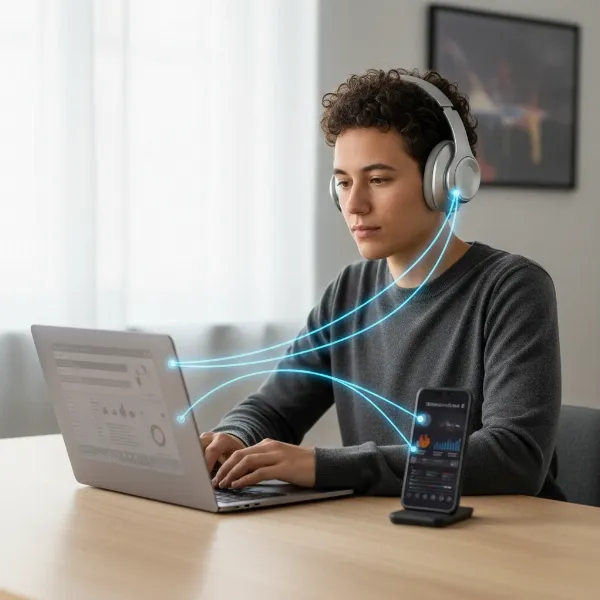 Person seamlessly switching audio between laptop and phone with multipoint headphones
Efficient Call Management
Imagine having both your personal and work phones connected to the same pair of headphones. With multipoint, you can seamlessly answer calls coming to either device. For those who frequently manage multiple lines or deal with a high volume of incoming calls, this feature ensures that you’re always reachable and can manage conversations without the awkward pause of switching headsets. Advanced multipoint even allows for complex call handling, such as putting one call on hold to answer another.
> “Multipoint connectivity isn’t just about convenience; it’s about eliminating friction from your daily digital interactions. It empowers users to stay connected and productive without the usual technological hurdles.” – Dr. Elena Petrova, Lead Audio Engineer at Sonic Innovations
Never Miss a Beat (or a Call)
In scenarios where missing an important call or notification is simply not an option, multipoint connection acts as your personal audio assistant. Whether it’s a critical client call interrupting your music or a family member trying to reach you during an intense gaming session, multipoint ensures that the most important audio takes precedence, alerting you promptly and allowing for an immediate response. This means peace of mind, knowing you’re always connected to what matters most.
Who Benefits Most from Multipoint Headphones?
While anyone with multiple devices can appreciate the convenience of multipoint, certain groups find it particularly invaluable:
- Professionals and Hybrid Workers: Those who frequently switch between video conferencing on a laptop and phone calls, or manage both personal and work smartphones. It simplifies the audio experience in a busy professional environment.
- Students: Ideal for listening to online lectures or music on a laptop while receiving notifications or calls from a smartphone or tablet.
- Sales and Customer Service Representatives: Managing multiple lines of communication becomes effortless, ensuring no customer inquiry goes unanswered.
- Casual Users: Even for everyday use, switching between a smart TV and a phone for a quick call, or a tablet for media and a phone for notifications, offers a significantly smoother experience.
Choosing Headphones with Multipoint
When investing in new headphones, especially wireless ones, checking for multipoint connectivity is a crucial step if you frequently use multiple devices. Always review the product specifications carefully, as not all Bluetooth headphones offer this feature. Look for explicit mentions of “multipoint connection,” “simultaneous connection,” or “dual device connectivity” in the product description. While many premium brands have adopted this technology, it’s becoming more common across various price points.
Maximizing Your Multipoint Experience
To get the most out of your multipoint headphones:
- Check Device Compatibility: Ensure your source devices (laptop, smartphone, tablet) are also capable of maintaining stable Bluetooth connections.
- Keep Firmware Updated: Headphone manufacturers often release firmware updates that improve multipoint stability and performance. Regularly check for and install these updates.
- Understand Prioritization: Familiarize yourself with how your specific headphones prioritize audio streams. Most prioritize incoming calls, but knowing the exact behavior helps manage expectations.
Conclusion
Multipoint connection is a testament to how intelligent technology can simplify our increasingly complex digital lives. By enabling your headphones to seamlessly interact with multiple devices, it eradicates the constant need for manual switching, boosts productivity, and ensures you’re always connected to the most important audio. If you’re looking for an upgrade that truly enhances your daily audio experience, choosing headphones with multipoint connectivity is a smart decision that will bring unparalleled convenience and efficiency.
What devices do you juggle daily that would benefit most from multipoint headphones?
Frequently Asked Questions
What is the primary difference between standard Bluetooth and Bluetooth multipoint?
Standard Bluetooth headphones typically connect to only one device at a time, requiring you to manually disconnect and reconnect to switch audio sources. Bluetooth multipoint allows your headphones to maintain simultaneous active connections with two or more devices, enabling seamless automatic switching between them without re-pairing.
Can I listen to audio from two devices simultaneously with multipoint headphones?
Generally, no. While multipoint headphones are connected to multiple devices, they typically only stream audio from one device at a time. The technology intelligently prioritizes audio, often pausing media from one source to play an incoming call or notification from another.
Do all wireless headphones have multipoint connection?
No, multipoint connection is not a universal feature across all wireless headphones. It is a more advanced functionality, so it’s essential to check the product specifications or description before purchasing to ensure the headphones explicitly state they support multipoint connectivity.
Does multipoint connection drain headphone battery faster?
While theoretically connecting to multiple devices might consume slightly more power than a single connection, the difference in battery drain is usually negligible and often unnoticeable during typical daily use. The convenience it offers far outweighs any minimal impact on battery life.