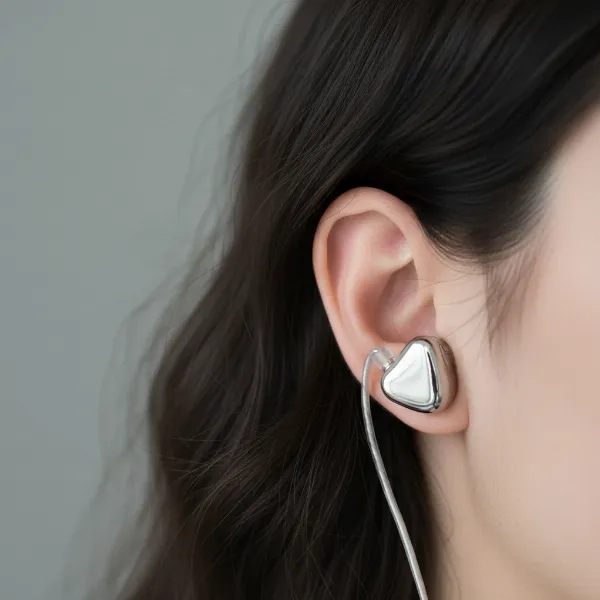
Stepping into virtual reality is an awe-inspiring experience, a journey into digital realms that captivate your senses. You’ve strapped on the headset, the visuals are breathtaking, but is something missing? Often, the unsung hero of true VR immersion is sound. The tinny, distant audio from built-in headset speakers can shatter the illusion, reminding you of the real world you’ve tried to escape. The quest for the best headphones for virtual reality isn’t merely about finding an accessory; it’s about discovering the final, critical piece of the immersion puzzle, ensuring every whisper, explosion, and directional cue pulls you deeper into the digital frontier.
The Indispensable Role of Audio in Virtual Reality
While stunning visuals might grab your immediate attention in VR, audio is the silent architect that builds believable worlds, guides your emotions, and roots you firmly within the experience. Our brains rely heavily on a complex interplay of sight and sound to interpret our surroundings. In VR, this interplay is everything. High-quality, spatially accurate audio provides essential environmental cues that make your brain believe the virtual world is real – a phenomenon known as “presence.”
Consider navigating a dense virtual forest. With standard audio, you hear the general sounds of nature. With high-fidelity, spatialized audio delivered by the right headphones, you locate the rustle of leaves directly behind you, the distant cry of a bird soaring above, or the crunch of footsteps approaching from your left. This ability to pinpoint sounds in three-dimensional space is achieved through advanced technologies like Head-Related Transfer Functions (HRTF), which simulate how sound waves interact with your head and ears. This isn’t just stereo; it’s a full 360-degree soundscape that is vital for truly selling the illusion. As one expert puts it:
“Visuals might initially draw you into VR, but it’s the audio that ultimately convinces your brain that you’re truly there.”
Key Features to Look For in VR Headphones
Not all headphones are created equal, and the unique demands of virtual reality necessitate a specific set of features to maximize immersion and comfort during extended play.
Sound Quality & Spatial Audio
Superior sound quality is paramount for VR. This encompasses several critical aspects:
- Frequency Response: A wide and balanced frequency response ensures you hear everything from the deepest bass of an explosion to the crispest highs of a sword clang, without distortion. While a neutral profile is often preferred for accuracy, a slight emphasis on clarity in mid and high ranges can help with crucial audio cues like dialogue and environmental details.
- Soundstage and Imaging: Soundstage refers to the perceived size and expansiveness of the audio environment. Imaging is the accuracy with which individual sounds are placed within that stage, allowing you to pinpoint their exact direction and distance. Excellent imaging is what enables you to react instinctively to an enemy’s footsteps or a sudden event.
- Spatial Audio Support: The best VR headphones must be compatible with spatial audio technologies used by game developers, such as Dolby Atmos, DTS:X, and Windows Sonic for Headphones. These software-driven algorithms work with standard stereo headphones to create the 3D sound experience.
|
Our Picks for the Best headphone in 2026
As an Amazon Associate I earn from qualifying purchases.
|
||
| Num | Product | Action |
|---|---|---|
| 1 | Sony WH-CH720N Noise Canceling Wireless Headphones Bluetooth Over The Ear Headset with Microphone and Alexa Built-in, Black New |

|
| 2 | Soundcore by Anker Q20i Hybrid Active Noise Cancelling Headphones, Wireless Over-Ear Bluetooth, 40H Long ANC Playtime, Hi-Res Audio, Big Bass, Customize via an App, Transparency Mode |
|
| 3 | Soundcore by Anker Q20i Hybrid Active Noise Cancelling Headphones, Wireless Over-Ear Bluetooth, 40H Long ANC Playtime, Hi-Res Audio, Big Bass, Customize via an App, Transparency Mode (White) |
|
| 4 | Amazon Basics On Ear Wired Computer Headset with Adjustable Microphone, 3.5mm Port or in-Line Control with USB-A Port, Foldable, Clear Sound, Small/Medium Size, Black |
|
| 5 | Amazon Basics Bluetooth On-Ear Headphones Wireless with Microphone, Deep Bass, 35 Hour Playtime, Foldable, Collapsible, Portable Travel Friendly, Black |
|
| 6 | Amazon Basics Hybrid Active Noise Cancelling Headphones, 35 Hours Playtime with ANC on and 45 Hours with ANC Off, Wireless, Over Ear Comfortable Fit, Bluetooth, One Size, Black |
|
| 7 | Sony WH-CH720N Noise Canceling Wireless Headphones Bluetooth Over The Ear Headset with Microphone and Alexa Built-in, White New |
|
| 8 | Soundcore by Anker Q20i Hybrid Active Noise Cancelling Headphones, Wireless Over-Ear Bluetooth, 40H Long ANC Playtime, Hi-Res Audio, Big Bass, Customize via an App, Transparency Mode (Pink) |
|
| 9 | Sony WH-CH720N Noise Canceling Wireless Headphones Bluetooth Over The Ear Headset with Microphone, Pink |
|
| 10 | Soundcore by Anker Q20i Hybrid Active Noise Cancelling Headphones, Wireless Over-Ear Bluetooth, 40H Long ANC Playtime, Hi-Res Audio, Big Bass, Customize via an App, Transparency Mode |
|
Comfort & Ergonomics
VR sessions can last for hours, making comfort an immersion-breaker if overlooked. The ideal headphones for VR should be:
- Lightweight: To avoid adding significant strain to your head and neck, which are already supporting the VR headset.
- Plush, Breathable Ear Cups: Over-ear (circumaural) designs are generally preferred as they fully enclose the ear, providing superior passive noise isolation and comfort compared to on-ear models. Breathable materials prevent overheating.
- Even Weight Distribution: The headband should distribute weight uniformly, preventing painful pressure points.
- Secure Fit: Headphones must remain firmly in place during vigorous movements without pinching or slipping. Adjustability is key to ensure a seamless fit over or alongside your VR headset straps.
Noise Isolation & Cancellation
Blocking out distractions from your physical environment is crucial for maintaining immersion.
- Passive Noise Isolation: Achieved through the physical design of the ear cups (e.g., closed-back headphones) and materials that create a tight seal around the ear. This is highly effective for blocking consistent low-frequency noises like PC fans or air conditioning.
- Active Noise Cancellation (ANC): Uses microphones to detect external sounds and generates an inverse sound wave to cancel them out electronically. ANC is excellent for irregular noises like conversations or keyboard clicks. While fantastic, high-quality passive isolation is often sufficient for VR and avoids potential ANC drawbacks like added cost, battery consumption, or a faint “hiss.”
Connectivity: Wired vs. Wireless
This choice significantly impacts freedom of movement and audio fidelity.
- Wired Headphones: Offer zero latency and no compression, delivering a pure and instantaneous audio signal. This is critical for maintaining perfect synchronization between visuals and sound. The main downside is managing the cable, which can snag during active VR experiences.
- Wireless Headphones: Provide unparalleled freedom of movement. However, for VR, low latency is non-negotiable. Standard Bluetooth often introduces noticeable delay, causing a disorienting sync issue. Look for models using dedicated low-latency radio frequency (RF) dongles (e.g., 2.4GHz) or advanced low-latency Bluetooth codecs like aptX Low Latency. RF dongles typically offer the most reliable lag-free wireless experience.
Microphone Quality
For social VR platforms, multiplayer games, or virtual meetings within VR, clear communication is essential.
- A good microphone with noise-canceling properties will filter out background noise, ensuring your voice is transmitted clearly.
- Retractable, detachable, or well-placed boom microphones are generally preferred for superior quality over integrated headset microphones.
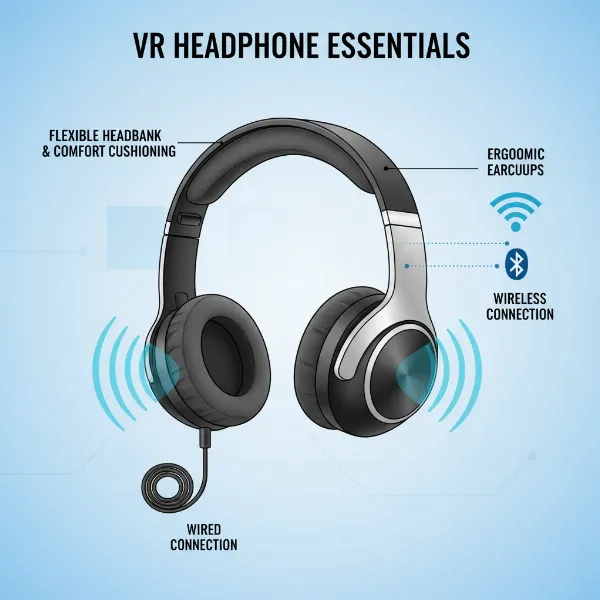 Illustration of key features in VR headphones including spatial audio, comfort, and connectivity.
Types of Headphones Suitable for VR
The physical design of headphones plays a significant role in comfort and overall immersion within virtual reality.
Over-Ear Headphones
These headphones feature ear cups that completely surround and enclose your ears.
- Pros: Generally considered the gold standard for VR due to their superior passive noise isolation, comfort during long sessions, and ability to house larger drivers for excellent sound quality and expansive soundstage. They create a truly immersive acoustic environment.
- Cons: Their bulk can sometimes conflict with the straps or design of certain VR headsets. Their weight also needs to be carefully considered for extended wear.
- Best for: Dedicated home VR setups where maximum immersion and audio fidelity are prioritized, especially for audiophiles.
On-Ear Headphones
On-ear headphones rest directly on the outer ear.
- Pros: They are often more compact and can be a good option if over-ear designs are uncomfortable or conflict with your VR headset’s head strap. They can also feel more breathable.
- Cons: They generally provide less effective noise isolation compared to over-ear models and can cause ear fatigue during long sessions due to direct pressure on the pinna (outer ear).
- Best for: Casual users who value portability and a less bulky profile, or those who find over-ears restrictive.
In-Ear Monitors (IEMs) / Earbuds
These fit directly into the ear canal, similar to traditional earbuds, but often with advanced drivers.
- Pros: Incredibly lightweight and discrete, eliminating any physical conflict with VR headset straps. High-quality IEMs can offer exceptional sound quality and excellent passive noise isolation.
- Cons: Some users may find them uncomfortable for very long periods, and they may not provide the same expansive soundstage as high-end over-ear headphones. Their small size might also make them feel less secure during vigorous movements.
- Best for: Active VR experiences, users who prioritize portability and minimal bulk, or those who prefer to keep their ears uncovered for a lighter feel. Many VR enthusiasts even use custom 3D-printed mounts to integrate IEMs or lightweight earbuds like the Koss Porta Pro directly onto their headsets.
Buying Guide: Choosing Your Ideal VR Headphones
Selecting the perfect headphones for your virtual reality journey involves more than just picking a popular brand. It’s about finding the right balance of technical prowess, comfort, and compatibility with your unique VR setup and personal preferences.
Determine Your Usage Needs
Start by considering how you’ll primarily use your VR headphones. Are you a hardcore gamer who needs precise positional audio for competitive titles? Do you enjoy social VR experiences where clear communication is key? Or do you mostly watch movies and immerse yourself in single-player adventures where atmosphere and sound quality are paramount? Your primary use case will heavily influence which features you should prioritize.
Consider Your VR Headset
Different VR headsets have varying designs, built-in audio solutions, and connectivity options.
- Standalone Headsets (e.g., Meta Quest): Often rely on Bluetooth or a 3.5mm jack. For wireless, prioritize models with low-latency dongles.
- PC-Based VR (e.g., Valve Index, PCVR via Quest Link): Offers the most flexibility, typically through a 3.5mm jack on the headset or directly on your PC. This opens up options for high-impedance wired audiophile headphones.
- Console VR (e.g., PSVR 2): May have specific wireless protocols or a 3.5mm jack on the controller or headset.
Some VR headsets, like the Valve Index, are known for excellent integrated audio that hovers near the ears. However, even with these, dedicated headphones can often provide a more immersive and detailed experience.
Set Your Budget
Headphones for VR are available across a wide price spectrum.
- Budget-Friendly Options: You can find decent wired or basic wireless options that offer a significant upgrade over built-in speakers. Focus on sound quality and passive isolation.
- Mid-Range: This segment offers a great balance of features, including better sound fidelity, improved comfort, and reliable low-latency wireless connectivity (often with RF dongles).
- Premium/Audiophile: For those seeking the absolute best, high-end wired headphones paired with a dedicated amplifier can deliver unparalleled audio detail and soundstage, while premium wireless headsets offer advanced ANC and robust gaming features.
Wired vs. Wireless Preference
This is a fundamental decision. If complete freedom of movement is your top priority for room-scale VR, a low-latency wireless solution with a dedicated RF dongle is ideal. If you prioritize absolute audio fidelity, zero latency, and don’t mind managing a cable, a high-quality wired headphone remains an excellent choice.
Read Reviews and Try Before You Buy
Research is crucial. Look for reviews that specifically address headphone performance in VR environments, focusing on spatial audio, comfort with a headset, and latency. If possible, physically try on headphones with your VR headset. What feels comfortable for 10 minutes might become painful after an hour, especially when combined with the weight and pressure of a VR headset. This hands-on experience is invaluable for assessing long-term comfort.
Trust Reputable Brands
Stick to well-known audio brands or gaming peripheral manufacturers that have a proven track record for quality and innovation. Companies like SteelSeries, Audio-Technica, Sony, Bose, HyperX, and Logitech often have models well-suited for VR.
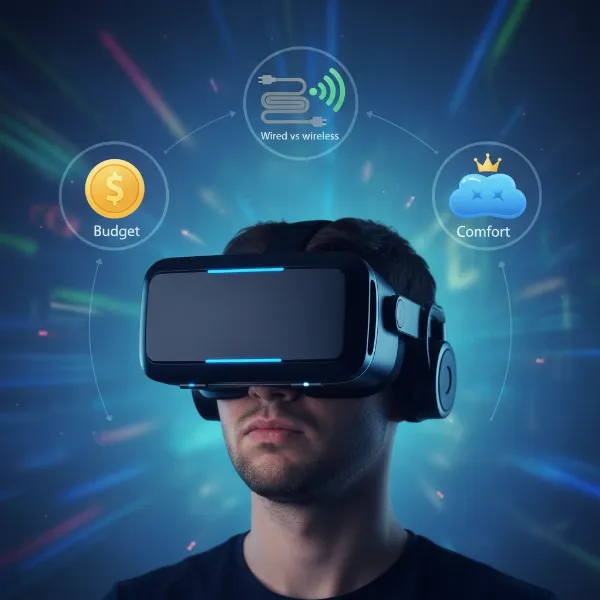 A person wearing a VR headset, with thought bubbles illustrating factors like budget, wired/wireless choice, and comfort as part of a buying guide.
Common Pitfalls to Avoid
When navigating the world of VR audio, it’s easy to fall into common traps that can diminish your experience.
- Ignoring Comfort: Prioritizing specifications over how the headphones actually feel during long VR sessions is a recipe for regret. Discomfort quickly breaks immersion.
- Prioritizing “Boomy” Bass: While strong bass can feel impactful, an overly boosted or muddy bass response can overwhelm other frequencies, making it difficult to discern crucial mid and high-range audio cues vital for spatial awareness.
- Underestimating Wireless Latency: Assuming all wireless connections are equal. Standard Bluetooth can introduce noticeable lag that severely detracts from the VR experience. Always seek out low-latency solutions for wireless VR.
- Neglecting Microphone Quality: If social interaction or multiplayer gaming is part of your VR routine, a clear and reliable microphone is just as important as the headphone’s audio output. Don’t rely on subpar built-in headset mics.
Conclusion
The journey into virtual reality is a multi-sensory expedition, and compromising on sound is akin to exploring a vibrant world with one sense muted. High-quality audio is not merely an enhancement; it’s a fundamental pillar of presence, transforming your VR experience from simply observing a scene to truly living within it. By prioritizing immersive audio fidelity, seamless comfort, and lag-free performance, you’re not just buying an accessory; you’re investing in the final key that unlocks the true, breathtaking potential of your virtual world. The right headphones ensure every whisper, footstep, and explosion lands with heart-pounding authenticity, making the digital tangibly real.
Which virtual world will you dive into next, fully immersed?
Frequently Asked Questions
Are headphones really necessary for VR?
While most VR headsets include built-in speakers, dedicated headphones are highly recommended. They provide superior audio fidelity, precise spatial audio, and crucial noise isolation, which collectively enhance immersion and allow your brain to believe the virtual world is real. Without them, the experience often feels less convincing.
What’s the best type of headphone for VR?
Over-ear headphones are generally considered the best for VR due to their excellent sound quality, expansive soundstage, and superior passive noise isolation. However, lightweight in-ear monitors (IEMs) can also be a fantastic option for portability and comfort, especially for active VR experiences. The “best” type ultimately depends on personal comfort and specific VR setup.
Can I use any wireless headphones for VR?
Not all wireless headphones are suitable for VR. Standard Bluetooth headphones often have noticeable audio latency, which can create a disorienting lag between visuals and sound. For a seamless wireless VR experience, prioritize headphones that use dedicated low-latency wireless technologies like 2.4GHz RF dongles or advanced low-latency Bluetooth codecs (e.g., aptX Low Latency). Wired headphones offer zero latency.
How does spatial audio work?
Spatial audio, or 3D audio, in VR uses advanced algorithms called Head-Related Transfer Functions (HRTF) to simulate how sound waves would naturally interact with your head and ears. This processing tricks your brain into perceiving sounds as coming from specific directions and distances around you, creating a full 360-degree sound environment even with standard stereo headphones.