Hey everyone, Alex here from Headphones Me. Let’s be honest, you’ve found a pair of headphones that looks great, you’ve read a few glowing reviews, and you’re ready to pull the trigger. Then you glance at the technical specifications, and it’s like trying to read a different language. Impedance? Frequency Response? THD? It’s enough to make your head spin. That’s why learning How To Read A Headphone Spec Sheet is one of the most empowering skills you can have as a music lover. It helps you cut through the marketing jargon and understand the real engineering behind the sound.
Think of a spec sheet as a headphone’s resume. It won’t tell you everything about its personality—how it actually sounds—but it gives you a fantastic baseline of its qualifications. In this guide, we’re going to decode those numbers and acronyms together, so you can walk away feeling confident, not confused.
The Core Audio Specs: What Really Affects Sound?
These are the big ones, the classic metrics that have defined audio gear for decades. Understanding them is the first step in your journey.
Frequency Response (Hz)
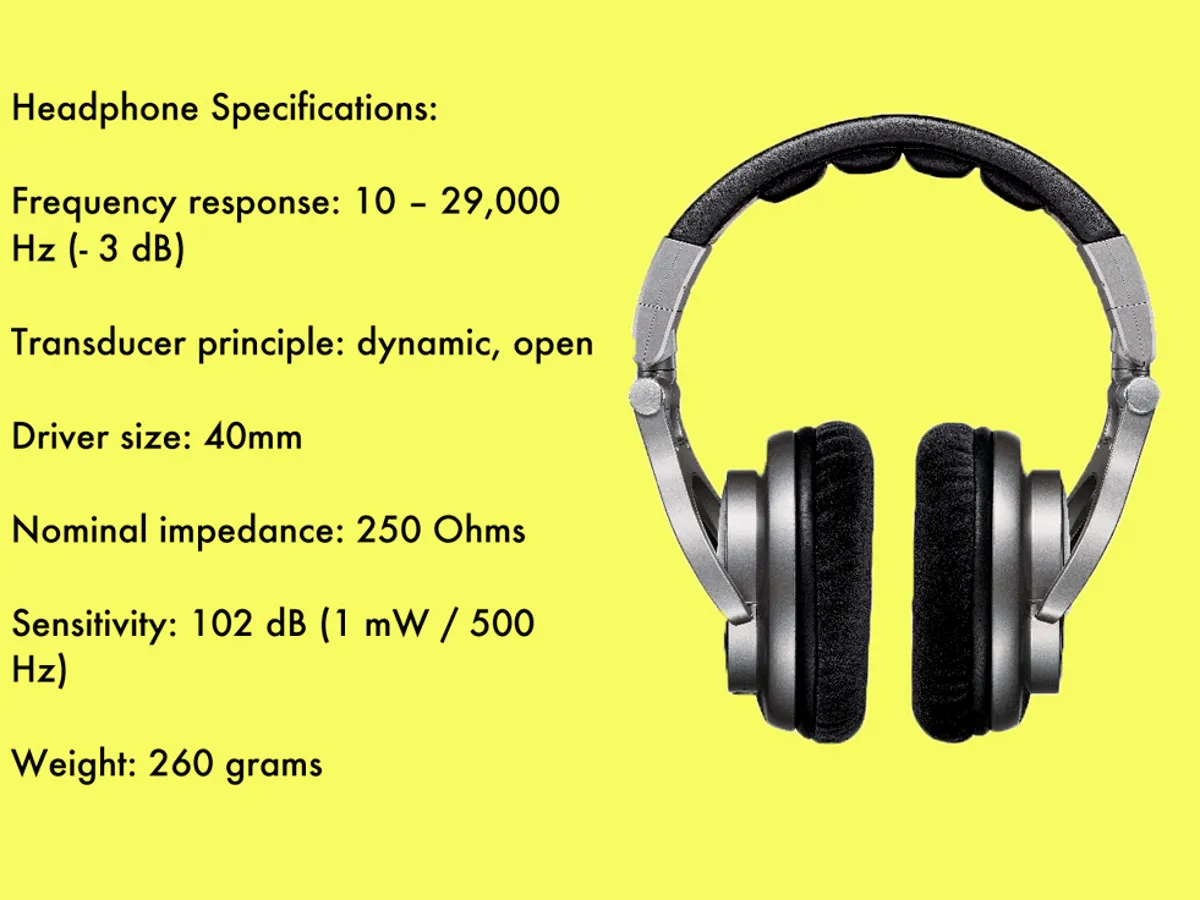
This is probably the most common spec you’ll see. It tells you the range of sound frequencies the headphones can reproduce, from the lowest bass to the highest treble. The typical range of human hearing is about 20Hz to 20,000Hz (or 20kHz).
- What you’ll see: 20Hz – 20,000Hz, or sometimes a wider range like 5Hz – 40,000Hz.
- In Plain English: This is the headphone’s potential sonic palette. A wider range doesn’t automatically mean better sound, but it suggests the drivers are capable of producing deep bass and airy highs.
- The Bottom Line: Don’t get too hung up on massive numbers here. Most quality headphones cover the standard 20Hz-20kHz range just fine. The quality of the sound within that range, often shown in a frequency response graph (which most brands don’t provide), is far more important than the range itself. Headphones certified for Hi-Res Audio will typically list a range up to 40,000Hz.
Impedance (Ohms Ω)
Impedance is essentially the electrical resistance of the headphones. It dictates how much power is needed to drive them to a good listening volume.
- What you’ll see: Numbers ranging from 16Ω to 600Ω.
- In Plain English: Think of it like water pressure in a hose. Low impedance (under 50Ω) is like a wide-open hose—it doesn’t require much pressure (power) to get a lot of water (volume) out. This is perfect for devices like smartphones and laptops. High impedance (above 50Ω) is like a narrow nozzle; you need a lot of pressure from a dedicated headphone amplifier to get the same flow.
- The Bottom Line: For everyday listening with your phone, look for headphones with an impedance of 32Ω or less. Studio professionals and serious audiophiles might opt for high-impedance models because they are often more durable and can offer more nuanced sound when paired with the right gear. Using high-impedance headphones with a phone will likely result in very low volume and weak bass.
Sensitivity (dB)
Sensitivity measures how loud the headphones will get at a given power level. It’s usually measured in decibels (dB) of Sound Pressure Level (SPL) per 1 milliwatt of power.
- What you’ll see: A number like 98 dB/mW or 105 dB/mW.
- In Plain English: This is all about efficiency. A higher sensitivity number means the headphones can get louder with less power. It works hand-in-hand with impedance.
- The Bottom Line: Most headphones for portable use fall between 95 dB and 110 dB. Anything in this range will get plenty loud from your phone. Be careful, as very high sensitivity can also make background hiss from the source device more noticeable.
Driver Type and Size (mm)
The driver is the heart of the headphone; it’s the tiny speaker that creates the sound waves. Size is measured in millimeters, and the type refers to the technology used.
- Dynamic Drivers: The most common type. They are great at producing powerful bass and are very reliable. Think of them as miniature versions of traditional speakers.
- Planar Magnetic Drivers: A favorite among audiophiles. They use a thin diaphragm between magnets to create incredibly fast, detailed, and distortion-free sound. They are typically found in more expensive, open-back headphones.
- Balanced Armature (BA) Drivers: Tiny drivers used almost exclusively in in-ear monitors (IEMs). They excel at detail and clarity in specific frequency ranges (like mids and highs). Many premium IEMs use multiple BAs to handle different parts of the sound spectrum.
“A larger dynamic driver can move more air, which often translates to more impactful bass. However, a well-engineered 40mm driver can easily outperform a poorly designed 50mm one. It’s the quality of the engineering, not just the size, that counts.” – Johnathan Carter, Audio Engineer with 15 years of experience.
The Modern Specs: Wireless and Convenience Features
In the age of true wireless earbuds and constant connectivity, these specs are just as important as the core audio metrics. This section will help you understand how to read a headphone spec sheet for today’s gear.
Bluetooth Version and Codecs
If you’re buying wireless headphones, this is arguably the most critical section.
- Bluetooth Version: Look for at least Bluetooth 5.0 or higher. Newer versions (5.2, 5.3) offer better stability, range, and efficiency, which translates to fewer dropouts and longer battery life.
- Bluetooth Codecs: This is the software that compresses and decompresses your audio for wireless transmission. It has a huge impact on sound quality.
- SBC: The mandatory, basic codec. It’s universal but offers the lowest quality. It gets the job done, but that’s about it.
- AAC: The standard for Apple devices. It’s a solid step up from SBC and offers great quality on iPhones and iPads.
- aptX / aptX HD: Common on Android devices and laptops. aptX is comparable to AAC, while aptX HD offers near-CD quality sound.
- LDAC / aptX Adaptive: These are the current top-tier codecs. LDAC, developed by Sony, can stream at near-Hi-Res quality. aptX Adaptive dynamically adjusts the bitrate for a stable connection and high quality.
Pro Tip: Your sound quality is only as good as the weakest link. To take advantage of LDAC, both your headphones and your phone (or music player) must support it.
Battery Life (Hours)
This one’s straightforward, but look for two key numbers:
- Total Playback Time: How long the headphones last on a single charge. For true wireless earbuds, this is often listed as “earbuds + case” (e.g., 8 hours in buds, 24 hours from the case).
- Quick Charge: A feature that gives you a significant amount of playback from a short charge (e.g., “1 hour of playback from a 5-minute charge”). This is a lifesaver for people on the go.
Noise Cancellation (ANC)
Active Noise Cancellation (ANC) uses microphones to listen to your environment and create an “anti-noise” wave to cancel it out. When I was testing the latest Bose and Sony models on a cross-country flight, the difference between good and great ANC was night and day.
The spec sheet, however, won’t tell you how good the ANC is. It’s usually just listed as a feature. This is where you need to rely on expert reviews (like ours here at Headphones Me!) that test ANC in real-world scenarios.
IP Rating (Ingress Protection)
This tells you how resistant the headphones are to dust and water. It’s crucial for workout or all-weather headphones.
- What you’ll see: IPX4, IP57, etc.
- The First Number (Dust): 1-6. 5 is dust-resistant, 6 is dust-tight. If you see an ‘X’ (like IPX4), it means it hasn’t been tested for dust.
- The Second Number (Water): 1-8.
- IPX4: Splash and sweat resistant. The minimum you want for workouts.
- IPX5: Can handle jets of water from any direction.
- IPX7: Can be submerged in 1 meter of water for 30 minutes.
Putting It All Together: A Practical Checklist
Specs can be overwhelming, so let’s create a simple checklist based on who you are.
- For the Daily Commuter:
- Priority 1: Active Noise Cancellation (ANC).
- Priority 2: Battery Life (at least 20-30 hours).
- Priority 3: Codec support (AAC for Apple, aptX for Android).
- Nice to have: A comfortable, lightweight design.
- For the Fitness Enthusiast:
- Priority 1: IP Rating (IPX4 or higher).
- Priority 2: A secure and stable fit.
- Priority 3: Quick charge feature.
- Nice to have: On-device controls that are easy to use while moving.
- For the At-Home Audiophile:
- Priority 1: Driver Type (Planar Magnetic or high-end Dynamic).
- Priority 2: Open-back vs. Closed-back design.
- Priority 3: High Impedance (if you have an amplifier).
- Nice to have: A wide frequency response and low THD (Total Harmonic Distortion).
Frequently Asked Questions (FAQ)
Q: Is a wider frequency range always better?
A: Not necessarily. While a range like 5Hz – 40,000Hz indicates capable hardware, the tuning and quality of the sound within the human hearing range (20Hz – 20,000Hz) are far more important. It’s a bit like having a car with a speedometer that goes to 200 mph—it’s impressive, but not very practical.
Q: Do I need a headphone amp?
A: If your headphones have an impedance of 50 Ohms or higher, you will likely benefit from a dedicated headphone amplifier to get the best volume and sound quality. For most consumer headphones under 32 Ohms, your phone or laptop will provide plenty of power.
Q: What is more important: impedance or sensitivity?
A: They work together. A headphone with low impedance and high sensitivity will be very easy to drive and get very loud. A headphone with high impedance and low sensitivity will be very difficult to drive. For portable use, a combination of low impedance (under 32Ω) and moderate-to-high sensitivity (98dB+) is ideal.
Q: Can I use headphones with aptX on my iPhone?
A: Yes, you can, but they will default to a lower-quality codec, either SBC or AAC. Since iPhones use AAC as their preferred high-quality codec, you will get the best wireless audio experience on an iPhone by using headphones that also support AAC.
Q: What does THD (Total Harmonic Distortion) mean?
A: THD measures the amount of unwanted distortion or “noise” a headphone adds to the original signal. It’s usually listed as a percentage, like “<0.1%”. A lower number is better, indicating a cleaner, more accurate sound. For most listeners, anything under 1% is generally inaudible.
The Final Word
Learning how to read a headphone spec sheet is about transforming a list of numbers into a story about what a headphone can do. It’s your first line of defense against marketing hype and your best tool for narrowing down your choices.
Remember, specs are the map, but your ears are the destination. They provide an excellent guide, but they can’t replace the experience of listening. Use this knowledge to find headphones that look good on paper, and then dive into reviews and, if possible, listen for yourself to find the pair that truly sings to you.
For more in-depth analyses, be sure to check out our detailed reviews where we put these specs to the test in the real world.